CRTech
SpaceClaim
eliminates
analysis
bottlenecks
created when
CAD-based
design
geometry is
not directly
accessible,
or when it
is too
detailed for
simulation
purposes, or
when
equivalent
geometry
cannot
easily be
generated by
a
thermal/fluid
engineer who
is not also
a CAD
specialist.
For example,
perhaps a
CAD model
has been
created by a
different
organization
such that
the analyst
does not
have access
to the same
CAD software
version, or
perhaps the
originating
organization
does not
wish to
release the
design in
the original
CAD format
to protect
proprietary
information.
In either
scenario,
the
organization
may release
“dumb
geometry”
such as
STEP, IGES,
or ACIS.
Almost any
translation
eliminates
the history
of the part,
leaving the
analyst with
bodies,
faces,
lines, and
vertices.
Traditional
CAD systems
rely on the
history to
be able to
parametrically
modify the
geometry.
However,
with CRTech
SpaceClaim,
features are
automatically
recognized,
and even
"dumb
geometry"
can be
parametrically
modified. In
fact,
parameters
may be
arbitrarily
added by the
user to
modify any
aspect of
the
geometry,
completely
independent
of how the
geometry was
originally
created.
Any CAD
conversions
could also
result in
small
surfaces and
slivers,
gaps between
surfaces,
and
interference
between
components.
Such defects
can prevent
surfaces
from closing
as a solid,
and can
defeat even
the most
advanced
meshers.
Even without
these
geometric
defects, the
original CAD
parts and
assemblies
were
intended for
manufacturing,
not for
analysis.
Midsurfaces
must be
created when
2D meshes
are
preferable
to 3D
meshes.
Planes of
symmetry
must be cut.
Such
simplifications
are not
possible in
many CAD
systems.
Furthermore,
unimportant
holes,
fillets,
welds, etc.
must be
removed or
defeatured,
but to
remove them
they must
first be
recognized
as design
features. In
the past,
such
defeaturing
was only
possible if
the analyst
owned and
was trained
in the same
CAD software
that the
design
engineer
used, and if
the design
engineer use
good
modeling
practices.
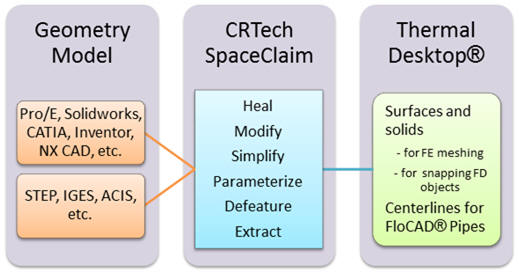
SpaceClaim
Corporation’s
SpaceClaim
Engineer® is
devoted to
CAE
preparation
from CAD
models. It
can read
native CAD
files for
most
available
formats,
including
STEP, IGES,
or ACIS. It
recognizes
design
features for
any type of
imported
file, and
analyzes
geometry in
order to
automate
simplification
and healing
operations.
Imported
geometry can
be easily
modified,
and new
geometry can
also be
added
quickly
using
“push-pull”
techniques
that
eliminate
the need for
extensive
training and
tracking of
part
histories.
CRTech
SpaceClaim
extends this
product with
features
appropriate
to thermal
modeling in
general, and
to Thermal
Desktop
specifically.

Additional
Information
Introduction
CAD to CAE
Bottlenecks
Parametric
or
history-based
CAD modeling
allows
complex
parts to be
constructed
algorithmically:
a “recipe”
is created
by the
designer.
For example
(in
English):
“Extrude
this
rectangle
along an arc
to create a
solid, then
cut a hole
through the
side, then
chamfer the
edges of
that hole,
then round
the edges of
the top and
bottom faces
that
resulted
from the
extrusion.”
In essence,
the designer
is creating
a computer
program (the
history or
“recipe”)
complete
with
variables or
parameters
for each
step.
History-based
modeling is
extremely
popular with
designers,
in part
because the
part
construction
often mimics
manufacturing
steps.
Unfortunately,
an analyst
who inherits
the design
drawings
must learn
the CAD
system
and each
part’s
recipe
well enough
to “roll
back”
features
such as
chamfers and
small holes
that disrupt
meshing, or
that slow
radiation
and
convection
solutions.
Even then,
some
features
cannot be
easily
removed, and
some CAD
systems
don’t
provide
defeaturing
tools
critical to
thermal
analysis
such as
midsurfacing,
or they
don’t allow
the analyst
to store
their
simplified
representations
along with
the detailed
manufacturing
drawing.
And that
is the
lucky
analyst who
has access
to the same
CAD software
used by the
designer,
and was
willing to
be trained
in that
software and
use it often
enough to
retain the
necessary
skills. For
some
analysts,
this meant
acquiring
licenses and
maintaining
their skills
in multiple
CAD systems.
Nonetheless,
this
situation is
appropriate
for a
designer who
does
occasional
analysis, or
for certain
manufacturing
applications
where
modification
of the
design
geometry is
either not
possible or
not desired.
For the
remainder …
for the
unlucky
analysts who
cannot share
the same CAD
system or
who do not
have access
to the
native part
and assembly
files … the
situation is
even worse.
To start,
the
“recipes”
upon which
the parts
are based
are
intentionally
unavailable
outside the
native CAD
system (in
part to
prevent an
organization
from easily
changing to
different
CAD
software).
Often, the
organization
originating
the part
often
considers
the design
proprietary
and will
release only
“dumb
geometry”
such as
STEP, IGES,
or ACIS
files.
Either way,
not only are
all recipes
lost in the
process
(including
identification
of features
such as
holes,
fillets,
rounds, and
chamfers),
but defects
in the
geometry are
generated as
well, such
as gaps and
slivers.
The bane
of the
thermal
engineer is
receiving a
detailed
STEP or IGES
file that
cannot be
defeatured,
manipulated,
or healed,
and which
often cannot
even be
closed as a
solid.
Thermal
Desktop’s
snap-on
simplification,
using the
“dumb
geometry”
file as
scaffolding,
is very
popular in
such cases.
The addition
of CRTech
SpaceClaim
to the
process of
preparing
Thermal
Desktop
models
provides
revolutionary
advantages
over that
prior state
of the art,
as will be
explained
below.
Direct
Modeling
Technology
While
driving
dimensions
can be
specified
parametrically
in CRTech
SpaceClaim,
it is not a
traditional
history-based
CAD system.
Instead, it
is a newer
direct
modeling
system. In a
direct
modeling
system,
geometric
components
are still
accessible
and
organized in
tree-like
structures,
but
there is no
recipe
because
there is no
need to know
any recipe.
Part
dimensions
and features
can be
changed
directly,
at any time,
and in any
order.
This
method is
possible
because a
direct
modeling
system is
perpetually
analyzing
the topology
of the model
and the
intentions
of the
designer. In
a nutshell,
it
recognizes
and
“understands”
the
geometry,
rather than
blindly
following a
recipe.
Direct
modeling is
like a
grammar-checking
word
processor …
versus a
typewriter.
Direct
modeling was
introduced
to try to
make CAD
modeling
simpler and
more
accessible,
and it
certainly
achieves
this goal.
Direct
modeling is
very easy to
learn, use,
and retain.
Arguments
over whether
it is enough
for all CAD
applications
abound on
the
internet,
and it is
unlikely to
replace
parametric
or
history-based
modeling in
all
manufacturing
applications.
But for the
analyst, it
is perfect.
It avoids
the need to
learn any
other CAD
system, and
(in the case
of
SpaceClaim)
has many
features
specifically
designed for
CAE model
preparation.
Being
easy to
learn and
use,
analysts
will often
use it to
create their
own
geometry.
After all,
creating an
analysis
model is not
always a
matter of
subtracting
or
simplifying
manufacturing
geometry,
but also
adding what
is not
there …
enclosures,
terrestrial
planes and
other
environments,
planes of
symmetry,
expendables
(e.g., fuel
or coolant),
etc.
Since the
point of
analysis is
not just to
verify a
design but
to adjust
and optimize
it, the
ability of a
thermal
engineer to
quickly
modify a
design,
evaluating
that
variation,
and then
report any
modifications
to the
design
engineer is
also
valuable.
But when
it comes to
simplifying
manufacturing
geometry,
from
virtually
any source
including
STEP and
IGES, direct
modeling
shines. Why?
Because the
same
“understanding”
of the
geometry and
independence
from the
original
recipe means
that it can
essentially
import any
CAD model or
geometric
file, and
figure out
how the
basics of
how it was
formed, or
how it
should be
automatically
modified if
adjusted. It
automatically
recognizes
features
based on the
topology,
without
needing to
be told that
a rounded
edge was
formed by
subtraction
from a sharp
edge, for
example.
Once
recognized …
essentially
reverse-engineered
into the
original CAD
part …
features
such as
holes and
fillets can
either be
retained or
removed
according to
the thermal
analyst’s
needs. A new
and
re-purposed
model can be
quickly
created. It
is important
to keep in
mind that
once a
complex and
derivative
part has
been
returned to
a simplified
state, it is
now amenable
to
parametric
manipulation.
Simplification
doesn’t just
increase
speed and
accuracy, it
restores
accessibility.
If the
intent of
direct
modeling was
to reduce
the time it
takes to
learn and
use CAD
software,
then the
“side
effects” of
nearly
global
import,
healing, and
defeaturing
are gifts to
every CAE
analyst. For
the thermal
engineer,
who often
deals with
system-level
models that
include air
flow,
radiation,
etc., these
gifts are
doubly
important
because the
need to
simplify and
reduce nodal
density
isn’t just a
convenience,
it is often
enabling.
A Unique
Focus on CAE
The power
of direct
modeling has
not gone
unnoticed by
the major
CAD software
vendors, in
part because
it allows
their users
to import
competitor’s
files, and
in part
because it
makes their
products
more
attractive
to casual or
intermittent
users where
the
retention of
skills is a
major issue.
The “side
effects”
that make
direct
modeling
appealing to
the CAE
analyst have
also not
gone
unnoticed.
However,
only one
direct
modeling
tool has
dedicated
itself to
CAE model
preparation
as a primary
market:
SpaceClaim
Engineer.
This is why
C&R
Technologies
selected it
as the basis
for CRTech
SpaceClaim,
which offers
extensions
specific to
thermal/fluid
engineering.
Just the
Beginning
C&R
Technologies
is actively
developing
both
additional
extensions
to CRTech
SpaceClaim,
as well as
corresponding
extensions
to Thermal
Desktop to
better
exploit
upstream
preparation
of thermal
geometry
within
SpaceClaim.
While
SpaceClaim
offers
revolutionary
improvements
to the
thermal
engineer by
removing CAD
bottlenecks,
the
revolution
isn’t over:
it is just
beginning.
C&R
Technologies
is also
working to
combine the
thermal
model
tagging and
advanced
meshing
features of
SpaceClaim
with
CRTech
Thermal
Workshop,
to achieve
the ultimate
in
flexibility
and power.
Watch for
announcements
in the
coming year!
For a
quick
example,
click here
For a
detailed
example,
click here